
As noted in our step by step Trust Deed Guide article, HubSolv's payment module contains functionality to let you view, edit and control all aspects of the trust deeds inbound and outbound payments and transaction history.
The following guide will give you some examples of how to deal with any changes to the expected payment schedule, and how to update the system with new changes.
Creating the Payments Schedule
When setting up the payment schedule for the first team you will need to select the frequency of payments (weekly/monthly/4 weekly etc) along with the expected first payment date. This will then activate the full schedule to be set up by pressing the blue Generate Payments button.
This will then set up the schedule of payments right through to the expected end date of contributions. Any step contributions will show in here too and we will show you how to do this later in this article.
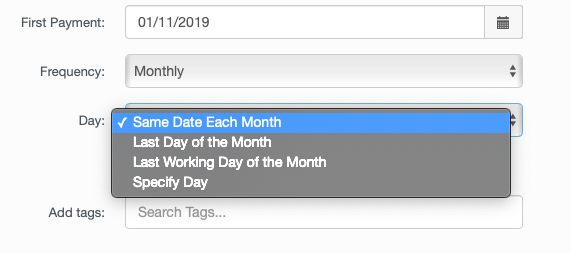
For monthly payers we also have the functionality to be able to choose the payment date - from a specific date (1st, 31st etc), to a specific day (4th Thursday of the month)
Adding a New Payment Date
Within the schedule, if you wish to make any amendments to payment dates, or even add in a new one you can follow the process outlined in the below video.
Payout to Creditor/Client Refund
The video below shows how to process payments out to creditors, and a client refund.
Amend a Payment Frequency
The module also gives you the capability of amending payment frequencies so that if a debtor moves from paying in monthly instalments to weekly contributions then the video below shows you how to alter the schedule.
Amend Schedule - Catch Up Arrangement
Within the schedule it is possible to amend payments so that in the event of a catch-up arrangement to cover missed payments or arrears, you can split the deficit over the next few instalments. The video below gives an example of how to set up a catch-up arrangement.
Please email into helpdesk@hubsolv.com if you require any further information or assistance on the payments schedule tab.
Comments
0 comments
Article is closed for comments.