
Complementing Hubsolv's feature to push leads to separate HubSolv accounts, there's also a feature to update leads within your Hubsolv account, as they progress.
This feature can be particularly handy for Introducers; to push packaged cases to Insolvency Practitioners to manage in HubSolv.
For example; an Introducer Company pushes a lead to an Insolvency Firm. If the insolvency firm is unable to contact that lead, The Introducer Company will get an update reflecting this.
The benefit for users pushing cases is the ability to stay up to date in real-time, eliminating the hassle of having to chase other companies to find out how your cases or leads are progressing.
In order to set this up, a new trigger has to be created for the campaign. This can be the same trigger as the trigger that pushes the case to the other HubSolv (Status Change). Once the trigger has been created, an action can be added with the following settings;
- Action: Add to campaign / change status.
- Campaign: Specify the relevant campaign.
- Campaign Status: Set the status for the lead. Most HubSolv users commonly keep the lead in their main campaign and just assign a status relevant to the other company i.e. push to 'insolvency firm'.
For configuring a notification, the settings can be as follow;
- Condition: Notification
- Pushed from HubSolv: URL of the HubSolv user/account that the lead updates are coming from
- Status ID set to: This is the original ID of the status from the other company's HubSolv, before any change. You will need assistance from the other HubSolv user to obtain this or you can contact the helpdesk
Once this is set up, let the trigger run. Statuses should change to the ones you designate when they change on the other HubSolv account.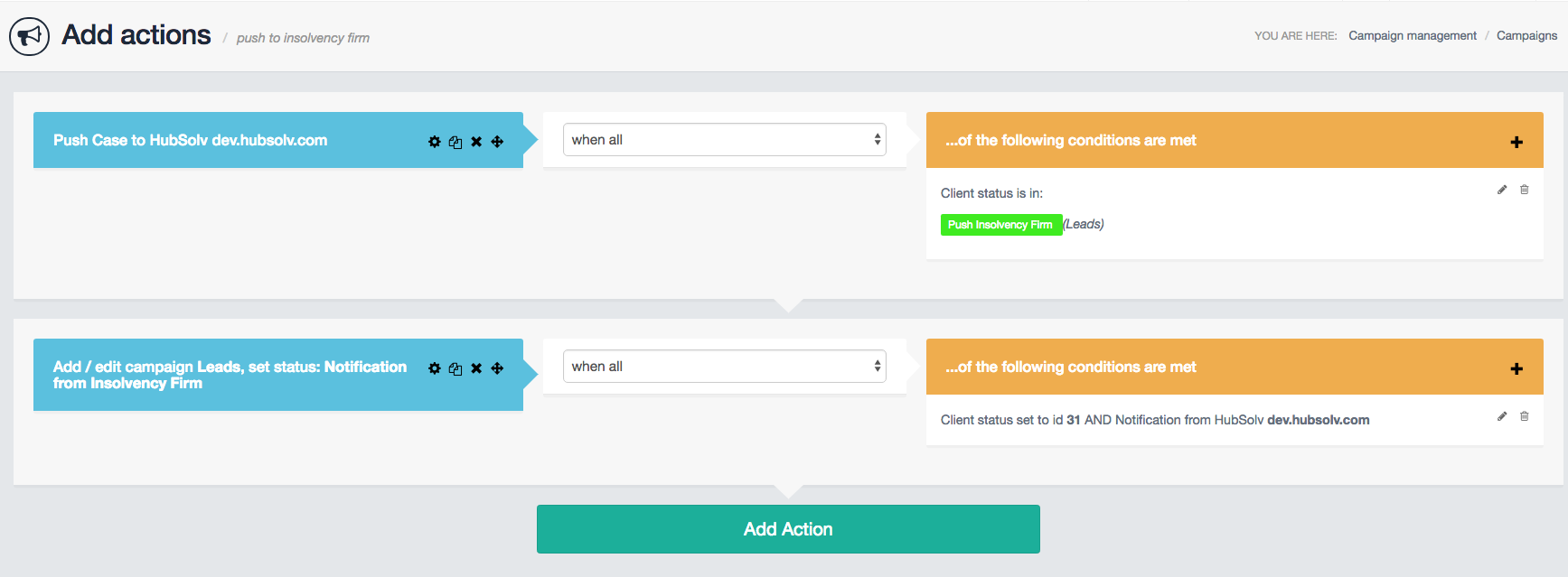
Comments
0 comments
Article is closed for comments.