
The first step to retrieving a record from HubSolv is to post an API access code for the client record to your own system. You can then use that access code to call the HubSolv API and retrieve all the data relating to that client record. This is commonly used to pass data across to a dialler or an external system.
Posting the access code is done via an automated action. There are a number of automated actions that can be triggered in HubSolv based on events in the system.
A favourable approach to posting an access code would be to send it based on a status change in the client record.
To implement this you will need to first set up a status that would trigger this process in your campaign, e.g. 'Push to My System' for a detailed guide on how to set up a status see this article:
Creating Campaigns and Statuses
Next step is to create the trigger
- Go to the campaign management icon at the left-hand side, and select campaigns.
- Click the edit triggers icon next to the appropriate campaign.
- Select the trigger 'Status Changed'
- Differentiate it from the other triggers you already have by calling it something identifiable, e.g. - 'Post Access Code to MySystem'
- Create the trigger
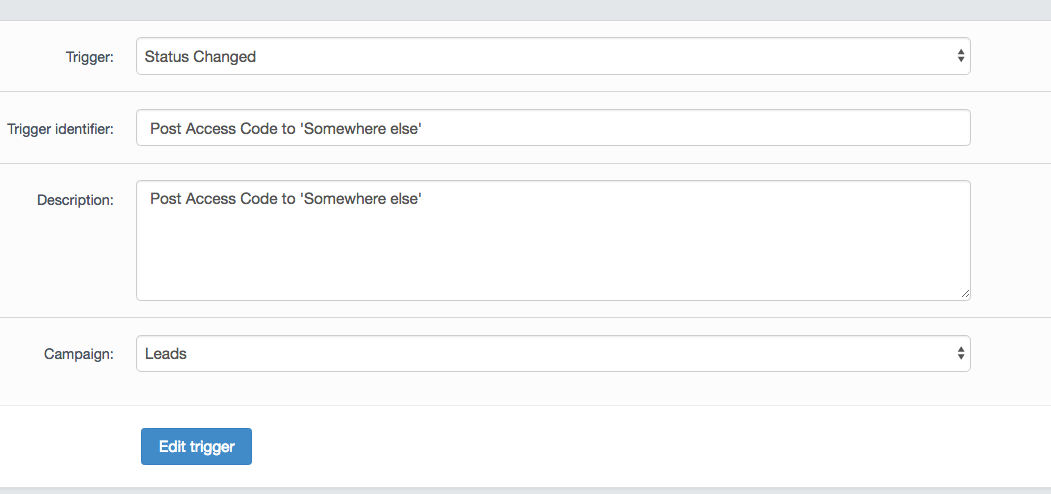
From here, click the add actions icon
- Configure the action 'Post API Access Code to URL' and enter the URL you wish to post the access to e.g. https://mywebsite.com/capture.php
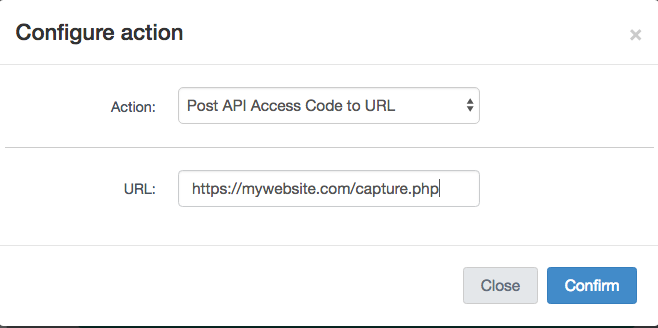
- Set the condition to when the client status is changed to the status you created earlier e.g. 'Push to MySystem'.

- Go back to the previous screen and click the Play icon as your trigger will initially be paused. This will enable the trigger and set it live.
Comments
0 comments
Article is closed for comments.