
HubSolv has the ability to take the notes you enter into the system and place them in documents. Using our dynamic fields we can take the last note in the system and place this in a word document, for this example we're going to be using it as reasons why the client can't proceed with a certain solution.
Dynamic Field: $last_note_suitablesolution$
The section highlighted in bold is the note type, if you want more note types added, feel free to contact support and we can add more in for you.
You can see all note types currently in your system by going to the notes section on any client record on the right hand side just below the campaigns section:
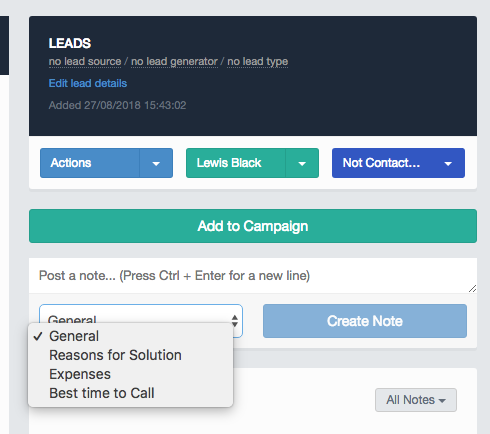
If you wish for a list of all note types you currently have, you can also contact support to get this Helpdesk@hubsolv.com
Example use case:
Our recommendation
Based on your needs and circumstances the debt solution we that we recommend that is suitable for your personal circumstances and for your level of affordability is the following:
$last_note_suitablesolution$
This will have a proposed payment amount of £$household_di$ per month.
Comments
0 comments
Please sign in to leave a comment.