
Managing your inbox can be done via The Hub whether that's SMS replies or your email inbox.
If you haven't set up your email or SMS settings contact Helpdesk@hubsolv.com who will be able to assist.
SMS Inbox
All SMS replies from clients will be displayed in the inbox column on your Hub. Here you are able to reply directly to a client, associate the reply to a client record and archive the message.
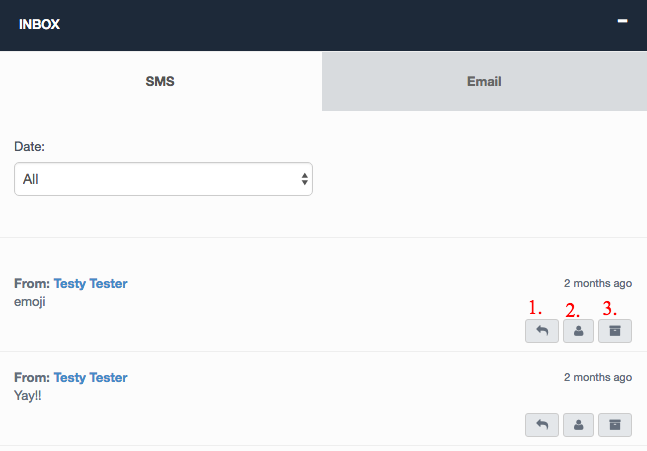
1. Reply directly to the client where users can insert fields pulling information/data from certain parts of the system
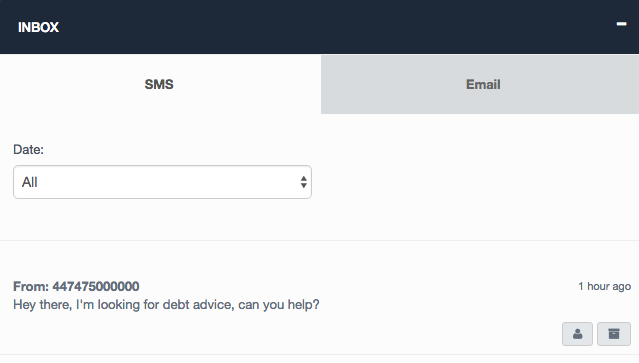
2. Associate the SMS with a client record. This is useful for those who have a contact number not yet associated with a client record (See image below)
3. From here you can archive an SMS from the inbox. This does not mean the SMS will be removed completely as it will still appear on the associated client record
Email Inbox
The email inbox functionality allows users to view full email, reply, forward, associate to a client record and archive.
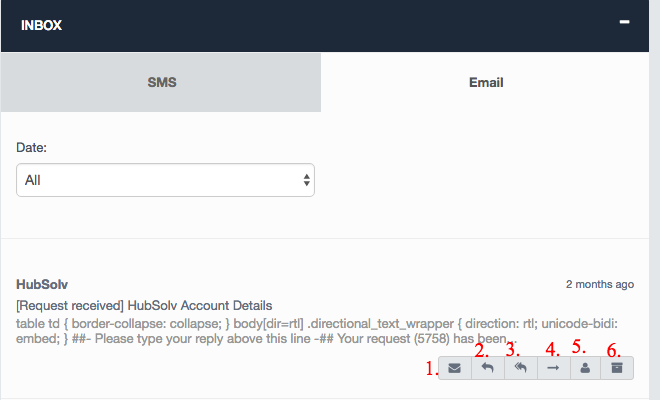
1. This function allows you to view the full email received as well as replying and forwarding through the actions drop down.
2. Replying opens up a separate window where the user can add attachments and insert merge fields
3. Reply all function if there's more than one address included
4. Forwarding with all functionality as replying
5. Associate the email reply to a client record
6. Archive the email but still stored within the client record
For any assistance in setting up or managing your inbox, contact helpdesk@hubsolv.com
Comments
0 comments
Article is closed for comments.