
Location
Messenger configuration settings are located under Settings > Messenger Configurations.
Within Settings, you can choose to 'Create Messenger Configuration'.
Details
When creating a Configuration you'll have to provide the following:
- Name
- Name of the configuration for your own reference.
- Description
- Add a description for further reference.
- Initial Message to Client
- This is the message the client first sees when they log in to HubSolv Messenger, for example: "Hi {firstname}, we can continue to chat here, please let me know if you have any questions. You can start by clicking the blue "+" icon at the bottom left hand side."
- Items * Optional
- These will be your Bank Statements, Credit Checks, Vehicle Checks and file uploads you request.
Items
Items define the way of gathering documents with HubSolv Messenger, performing credit searches and getting bank statements quickly. To add an item, you can click the Add Item button, located at the bottom of the page when you are creating a configuration.
You'll see the following options appear.
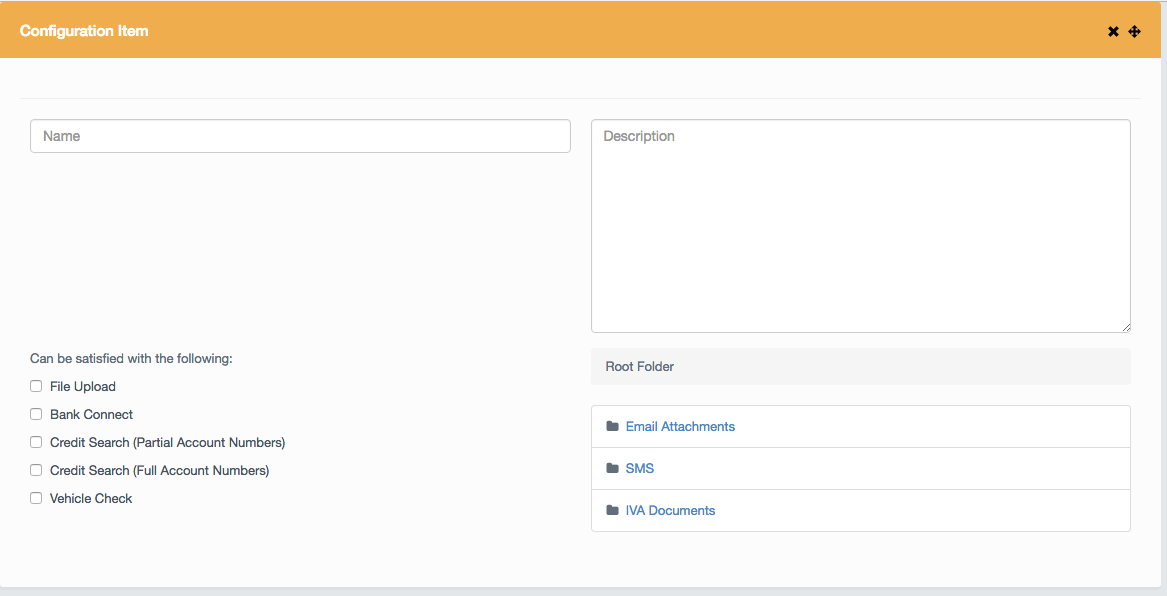
Fill out the information you wish to collect. You can ensure your items are filled out by one or multiple methods, such as uploading a file or carrying out a bank connect. You can also select in which folder the documents will be stored.
Once saved, the configuration will be selectable from the dropdown on HubSolv Messenger. This is just a faster way of rolling out conversations and to avoid repetition in creating the conversation.
There is no limit to the number of configurations you can have.
Comments
0 comments
Please sign in to leave a comment.